

How it works
The Drupal Wiki connector indexes content from your Drupal Wiki instance including spaces, pages, and optionally attachments. The connector fetches all accessible content upon initial setup and then performs incremental updates to keep your knowledge base synchronized. The connector respects the permissions of the provided API token, indexing only content that the token has access to, whether public or private.Setting up
Authorization
You will need an API access token for your Drupal Wiki instance. The token must start withpat: (Personal Access Token).
1
Navigate to your Drupal Wiki instance
Navigate to your Drupal Wiki instance
2
Generate an access token
Follow the documentation to generate an access token:
https://help.drupal-wiki.com/node/605#2-Zugriffs-Token-generieren
3
Ensure REST API is available
Ensure the REST API interface is available in your Drupal instance
4
Copy the API token
Copy the generated API token (it should start with
pat:)The API token determines which content will be accessible to Onyx.
Only content that the token user has permission to access will be indexed.
Indexing
1
Navigate to the Admin Dashboard
Navigate to the Admin Dashboard and select the Drupal Wiki connector
2
Provide your Drupal Wiki configuration
In Step 1, provide your Drupal Wiki configuration:
- API Token: The access token you generated (starting with
pat:)
3
Choose your indexing scope
In Step 2, choose your indexing scope:
- Base URL: The base URL of your Drupal Wiki instance (e.g.,
https://help.drupal-wiki.com) - All Content: Index all spaces and pages accessible to your API token
- Specific Spaces: Enter specific Space IDs to index only certain areas
- To find Space IDs, refer to: https://help.drupal-wiki.com/node/606
- Specific Pages: Enter specific Page (Node) IDs to index only certain pages
4
Configure additional options
Configure additional options:
- Include Attachments: Check this to also index file attachments (PDF, DOC, DOCX, XLS, XLSX, PPT, PPTX, TXT, HTML, MD, CSV)
5
Connect and start indexing
Click the
Connect button!
Your Drupal Wiki content will be indexed and kept up to date with incremental synchronization.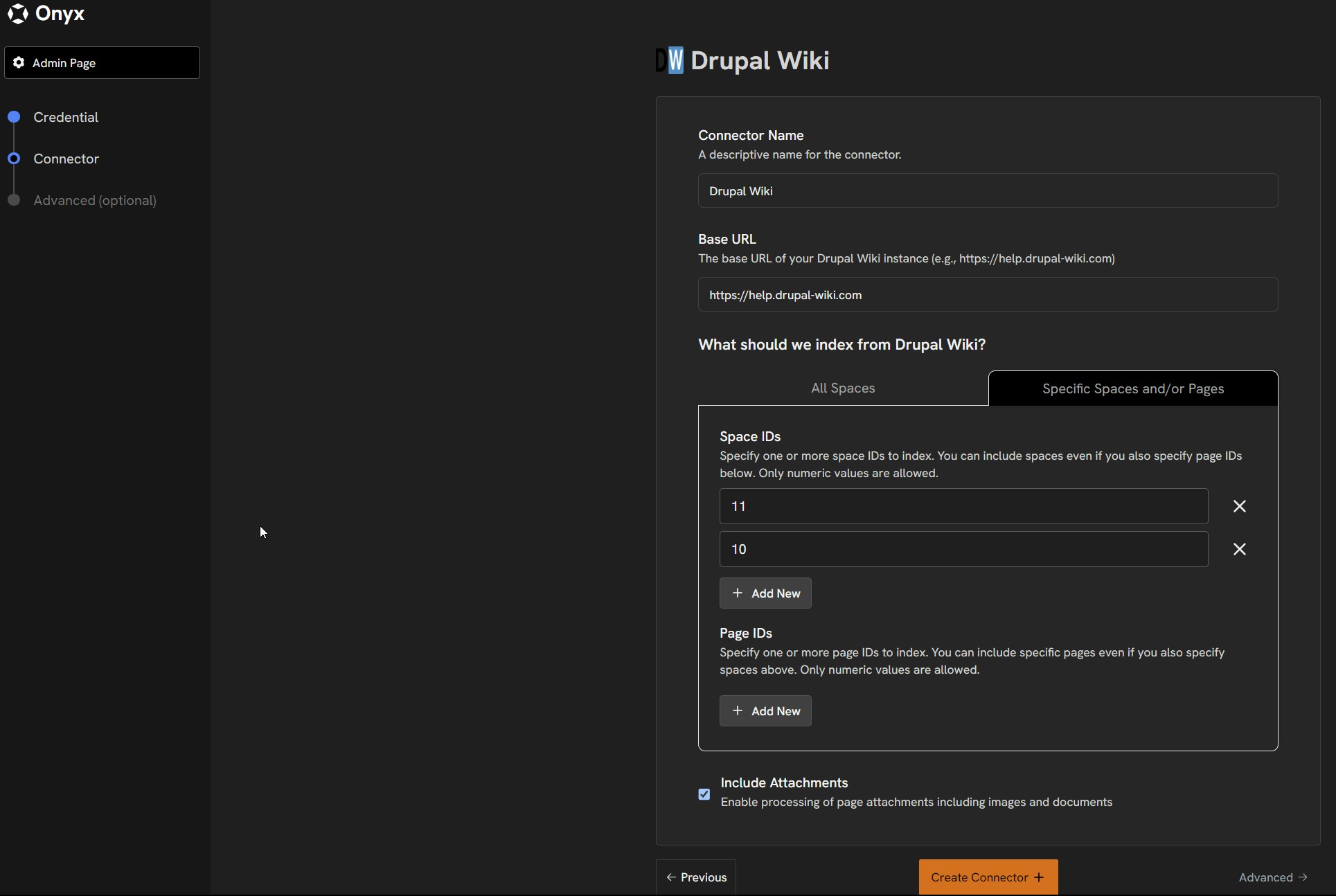
Supported Content Types
The Drupal Wiki connector indexes the following content:- Spaces: Organizational units within your Drupal Wiki
- Pages: Individual wiki pages with HTML content (converted to plain text)
- Attachments (optional): Various document formats up to 10MB
Technical Details
- API Usage: Uses Drupal Wiki’s REST API endpoints
- Synchronization: Supports incremental updates for efficient syncing
- Content Limits: 10MB for attachments, 600,000 characters for text content
- Deployment Support: Works with both self-hosted and cloud-hosted Drupal Wiki instances